
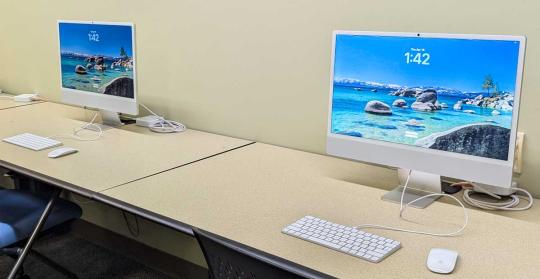
Digital Media Lab

Do you need to edit a video or audio file? Create a 3D model? Design a digital animation? The library has the tools you need to bring your vision to life in the Maker Commons.

The Media Lab has 10 high-performance workstations designed for creating and editing digital projects and working with large data sets across disciplines. Equipped with powerful computers and professional-grade tools, the lab supports everything from video and audio production to graphic design, 3D modeling, and data analysis. Whatever projects you’re working on, the Media Lab provides the technology and software needed to bring ideas to life. No reservations required, just stop by the Maker Commons in 2 South. 

Below is a list of relevant applications available in the Media Lab. 

Apple Video and Audio Pro Apps

  • Compressor
    • App to compress and encode video and audio media.
  • Final Cut Pro
    • Software that allows users to import, edit, and process video footage and output it to a wide variety of formats. A more advanced tool than iMovie.
  • GarageBand
    • For the creation of music or podcasts, this software includes software synthesizer presets, pre-made and user-created loops, an array of various effects, and voice recordings. Beginners might want to use this application rather than Logic Pro.
  • iMovie
    • Video editing application designed to be accessible to users with little or no experience. Includes a range of video effects and tools, such as color correction and image stabilization.
  • Logic Pro
    • Audio editing application that is more advanced than Garage Band.
  • MainStage
    • Audio application that works in a similar way and has a similar user interface to Logic Pro, although the focus is on live use rather than recording and editing.

Adobe Creative Cloud Apps 1

  • After Effects
    • Digital effects, motion graphics, and compositing application for animation and in the post-production process of film making, video games and television production. Among other things, After Effects can be used for keying, tracking, compositing, and animation. It also functions as a very basic non-linear editor, audio editor, and media transcoder.
  • Distiller
    • PDF tool that converts PostScript files to PDF documents, allowing users to customize conversion settings, manage security options, and automate workflows.
  • Illustrator
    • Vector graphics (digital graphics created using mathematically defined elements that can be scaled without any loss in image quality, as opposed to pixelated or raster images) editor and design software.
  • InDesign
    • Desktop publishing and page layout designing software application that can be used to create works such as posters, flyers, brochures, magazines, newspapers, presentations, books and ebooks.
  • Lightroom
    • Image organization and editing application primarily geared towards photographers that provides tools to import, view, organize, tag, edit, and export large numbers of digital images.
  • PhotoShop
    • Raster graphics (a grid of pixels) editor; the most used tool for professional digital art.
  • Premiere Pro
    • Professional video editing and postproduction software that allows users to edit & trim video, add effects, mix audio, extend video, and more. 

GoPro and THETA Apps 2

  • GoPro Player
    • Platform that allows users to play, trim, and export GoPro media into sharable photos and video.
  • THETA
    • Application for viewing high-quality 360-degree images and video that were captured with a RICOH THETA camera.
  • THETA File Transfer for Mac
  • Application to transfer files from a THETA camera to a Mac.
    • THETA Movie Converter
  • Software to convert the spatial audio recorded during video capture with the Ricoh Theta into a format suitable for YouTube.
    • THETA Stitcher
  • Program to combine THETA Dual Fisheye JPEG / TIFF images into a 360-degree image.

3D Modeling and Design Apps

  • AutoDesk Fusion 360 3
    • Cloud-based 3D modeling, computer-aided design, manufacturing, and engineering and printed circuit board software platform for product design and manufacturing.
  • AutoDesk Maya 2020
    • Software that allows users to perform 3D animation, modeling, simulation, and rendering.
  • Blender
    • Application that allows users to create animated films, visual effects, art, 3D-printed models, motion graphics, interactive 3D applications, virtual reality, and computer games.
  • Maxon Cinema 4D
    • 3D software suite for 3D modeling, animation, simulation, and rendering, popular for motion graphics, VFX, design, and game development 

Data Analysis Apps 

  • IBM SPSS
    • Platform provides advanced statistical analysis, a comprehensive library of machine learning algorithms, text analysis capabilities, open-source extensibility, integration with big data, and seamless application deployment.
  • JMP
    • Suite of computer programs for statistical analysis and machine learning, focused on exploratory visual analytics. It also supports the verification of these explorations by hypothesis testing, data mining, or other analytic methods.
  • Mathematica
    • Software system with built-in libraries that allows machine learning, statistics, symbolic computation, data manipulation, network analysis, time series analysis, natural language processing, and more.
  • Python3 for SPSS Statistics
    • General-purpose programming language plug-in for IBM SPSS Statistics that is very easy to learn and makes programming easier than SPSS syntax alone.
  • R for SPSS
    • Statistics Integration package that allows the use of R programming features within IBM SPSS Statistics.
  • Stata SE
    • Command-driven statistical software package designed for larger datasets, accommodating up to 32,767 variables and 2 billion observations. 

Other Apps

  • Audacity
    • Open source digital audio editor and recording application software.
  • BBEdit
    • HTML and text editor that provides an abundance of features for editing, searching, and manipulation of prose, source code, and textual data.
  • Camtasia 2024
    • Screen recording and video editing software. A more advanced product than SnagIt.
  • Google Earth Pro
    • Virtual globe program that uses satellite imagery, aerial photos, and 3D models to let users explore the entire planet, offering detailed views of cities, landscapes, and even the sky, with features such as street view, historical imagery, and the ability to add custom data to create immersive maps.
  • Offload
    • Simple app for getting your shots off a camera and onto a computer.
  • PluralEyes 3
    • Software that synchronizes audio and multi-camera video automatically.
  • Read&Write
    • Literacy support tool that features text-to-speech, text prediction, dictionary lookups, translation, and tools for organizing notes and proofreading SnagIt Screen capture, recording, and multimedia editing software used for screenshots, training videos, and information sharing. Features ease of use, screen capture of various content types, and image and video annotation capabilities.
  • VLC Player
    • Portable, cross-platform media player software and streaming media server.

1  All applications can be accessed using your SSU login credentials.
2 GoPro and THETA apps can only be used with the respective camera.
3 Autodesk apple can be accessed by creating an Autodesk account with your sonoma.edu email address to gain access for free.