
Media Production Studios
If you want to record audio or video using professional-grade equipment, book one of our Media Production Studios. These studios are set up for creating whatever kind of media you can imagine. The audio studio includes two microphones and a sound mixing board. The video studio has a teleprompter, light boxes, and a high-quality tripod. You can check out a camera and microphone from the Information/Checkout Desk or use your own phone or camera.
Book a Media Production Studio
Both studios include high-performance Macs for editing, or you can save your files and use our Media Lab to edit your work.
Studios can be booked on our website and are available for SSU students, faculty, and staff whenever the library is open at no cost.
Learn to use the equipment and software in the library's Maker Commons from
LinkedIn Learning
Equipment and Software
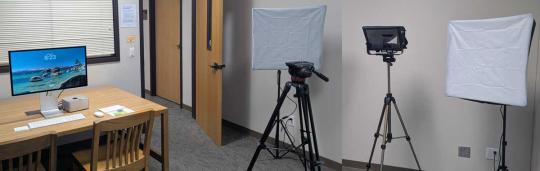
Video Production Studio - Schulz 2021
- Mac Studio, Apple Studio Display
- Panasonic 4K Pro Camcorder HC-X1600 (Check out at the Information Checkout Desk)
- Manfrotto 502 Professional Fluid Video Tripod
- Manfrotto Manual (pdf)
- DJI Osmo Mobile 7
- DJI Manual (pdf), DJI HTML Version
- Glide Gear TMP 100 Teleprompter
- Sennheiser MKE 600 Shotgun Microphone
- NEEWER NK200 24x24" 700W Photography Softbox Kit
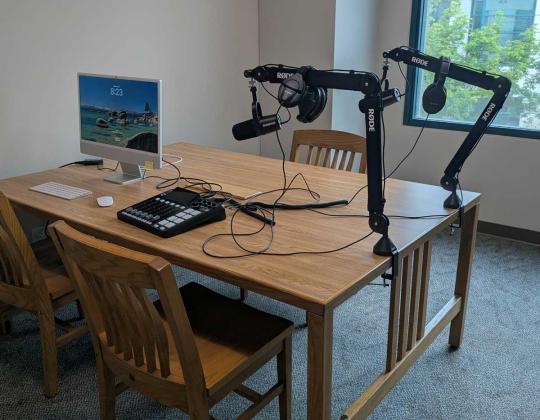
Podcasting / Audio Production Studio - Schulz 2020B
- 24-inch iMac
- RØDECaster Pro II mixing board
- Sennheiser HD 280 Pro Headphones
- HD 280 manual (pdf)
- Shure MV7+ podcast microphones
- MV7+ Manual (pdf), MV7+ HTML version
Studio Guidelines
- Studio equipment must be used according to Sonoma State and Library acceptable use policies.
- No food or open drinks in the studio
- Save your work to personal storage—files are deleted regularly
- Return equipment to its place and leave the studio clean
- Use equipment responsibly and report any issues to staff
- Studio doors must remain closed during use
End of Session
- Power down equipment
- Return microphones, cameras, and accessories
- Neatly coil cable
- Remove all personal belongings