

Media Lab
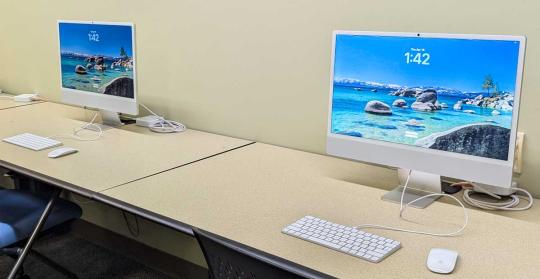
Do you need to edit a video or audio file? Create a 3D model? Design a digital animation? The library has the tools you need to bring your vision to life in the Maker Commons.
The Media Lab has 10 high-performance workstations designed for creating and editing digital projects and working with large data sets across disciplines. Equipped with powerful computers and professional-grade tools, the lab supports everything from video and audio production to graphic design, 3D modeling, and data analysis. Whatever projects you’re working on, the Media Lab provides the technology and software needed to bring ideas to life. No reservations required, just stop by the Maker Commons in 2 South.
Below is a list of relevant applications available in the Media Lab.
Apple Video and Audio Pro Apps
- GarageBand
- For the creation of music or podcasts, this software includes software synthesizer presets, pre-made and user-created loops, an array of various effects, and voice recordings. Beginners might want to use this application rather than Logic Pro.
- iMovie
Video editing application designed to be accessible to users with little or no experience. Includes a range of video effects and tools, such as color correction and image stabilization.
Adobe Creative Cloud Apps 1
- After Effects
- Digital effects, motion graphics, and compositing application for animation and in the post-production process of film making, video games and television production. Among other things, After Effects can be used for keying, tracking, compositing, and animation. It also functions as a very basic non-linear editor, audio editor, and media transcoder.
- Distiller
- PDF tool that converts PostScript files to PDF documents, allowing users to customize conversion settings, manage security options, and automate workflows.
- Illustrator
- Vector graphics (digital graphics created using mathematically defined elements that can be scaled without any loss in image quality, as opposed to pixelated or raster images) editor and design software.
- InDesign
- Desktop publishing and page layout designing software application that can be used to create works such as posters, flyers, brochures, magazines, newspapers, presentations, books and ebooks.
- Lightroom
- Image organization and editing application primarily geared towards photographers that provides tools to import, view, organize, tag, edit, and export large numbers of digital images.
- PhotoShop
- Raster graphics (a grid of pixels) editor; the most used tool for professional digital art.
- Premiere Pro
- Professional video editing and postproduction software that allows users to edit & trim video, add effects, mix audio, extend video, and more.
3D Modeling and Design Apps
- Blender
- Application that allows users to create animated films, visual effects, art, 3D-printed models, motion graphics, interactive 3D applications, virtual reality, and computer games.
Other Apps
- Audacity
- Open source digital audio editor and recording application software.
- VLC Player
- Portable, cross-platform media player software and streaming media server.
1 All applications can be accessed using your SSU login credentials.
2 GoPro and THETA apps can only be used with the respective camera.
3 Autodesk apple can be accessed by creating an Autodesk account with your sonoma.edu email address to gain access for free.